

Budget
BUDGET HUB
Tracking & Forecasting Your Costs
The Budget module is where you plan, control, and monitor the financial health of each project.
It provides a clear, real-time view of your project’s financial position by linking budgets to procurement, claims, variations, and invoices.
With Plexa, you can track committed costs, actual spend, and forecasted outcomes — all from one central dashboard — ensuring your projects stay on time and within budget.
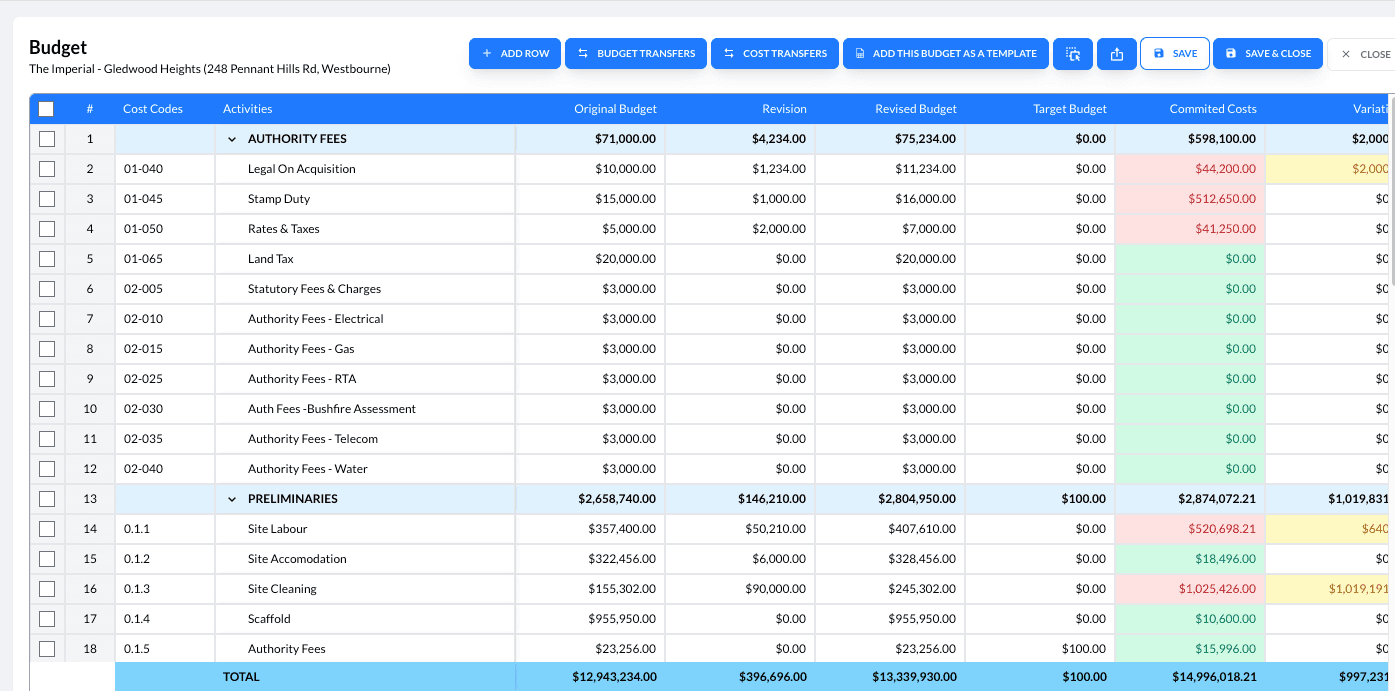
What You'll Find Here:
- Creating & Setting up Budgets → Define your cost structure at the start of each project.
Set budgets by trade, cost code, or package — aligning them with your accounting system for accurate tracking and reporting - Tracking Committed and Actual Costs → Monitor project performance in real time.
Compare committed costs (such as purchase orders and contracts) against actual costs (invoices and claims) to identify variances early - Variations and Adjustments → Add or adjust budget items as project changes occur.
Every approved variation automatically updates your budget and financial reports, maintaining a clear audit trail - Budget Review & Forecasting → Regularly review budget data to forecast the financial outcome of your project. Use visual indicators and filters to track overspend, under-utilised funds, and pending commitments
- Cost Codes & Categories → Organise costs for detailed reporting
- Integration across Modules → Budgets connect seamlessly to Procurement, Finance, and Timesheets — ensuring all financial activity is reflected accurately across Plexa
Align your budget codes with your accounting system (e.g., Xero or MYOB) for consistent reporting.
Always assign purchase orders and invoices to the correct cost codes.